


Kobo | eBooks & Audiobooks
4.521.14K Reviews
App Specs
- Version
- Varies with Device
- Updated On
- License
- Free
- Downloads
- 10,000,000+
- Developer
- Kobo Books
- Categories
- Books & Reference
- Platform
- Android, iOS
Screenshots

 Analysis by AppCompare
My view of a reading app comes down to a simple test: does it make it easier to return to a book when the day gets busy? Kobo | eBooks & Audiobooks aims to do that by bringing digital books and listening together. I find that combination useful for the small gaps in a routine—waiting for an appointment, taking a quiet break, or settling in after everyone else has gone to bed. It is not automatically the best choice for every reader, though; what you get from it depends on how you like to find, buy, and read books.
What the free download does—and does not mean
Kobo Books makes this free Books & Reference app, and it has been available since June 15, 2010. The free download is a low-friction way to try the app, but it should not be confused with every book or audiobook being free. The app offers in-app purchases, with listed item prices spanning $0.05 to $999.99. That is a very broad range, so I would check the price of a specific title or offer before committing rather than assume a particular cost.
That distinction matters when comparing Kobo with library-reading apps or services built around a subscription. A free app can still lead to paid content, while access through a library or a subscription may depend on separate eligibility or terms. Kobo’s app is most straightforward as a place to browse and manage digital reading; whether it is the cheapest way to read a particular book depends on the title and the purchase route you choose.
Getting Started with Kobo
Let’s kick off with the basics. Downloading the Kobo | eBooks & Audiobooks app is pretty straightforward, available on both Android and iOS. Once you’ve got it installed, setting up your account is a breeze. You can sign in with an email or through social media, which is a nice touch for those who like a quick setup.
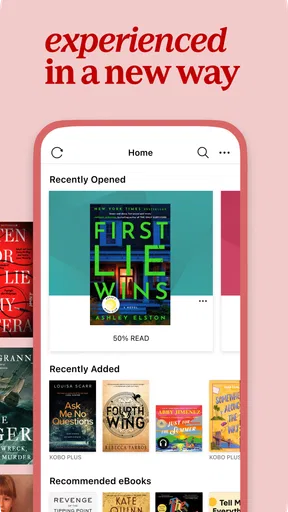
As soon as you’re in, you’re greeted with a clean, user-friendly interface. The design isn’t cluttered, which I appreciate because it means I can get straight to the good stuff — the books! The home screen showcases a variety of recommendations tailored to your reading habits, which is perfect for discovering new reads without endless scrolling.
The Reading Experience
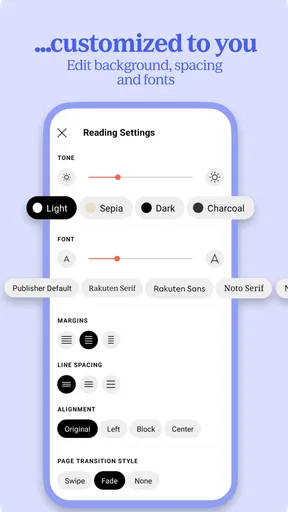
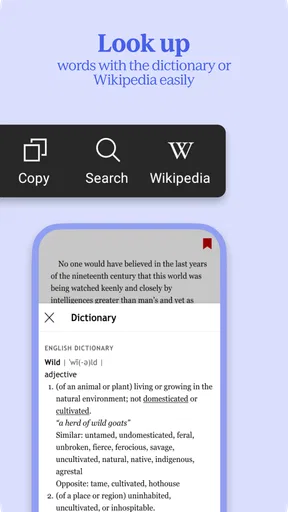
Now, onto the reading experience itself. One of the standout features is the ability to customize your reading settings. You can adjust font size, type, and even the background color. If you’re like me and enjoy reading late at night, the night mode is a lifesaver. No more blinding white screens!
Plus, Kobo supports a wide range of formats, which means you’re not limited to just ePub or PDF. This flexibility is great for those who have a mixed library from different sources.
Worth Reading Before You Choose

Flipboard Shows What News Apps Must Do Beyond the Feed

Switching to Android Auto Means Rethinking Your Driving Routine

Google Calendar Makes a Crowded Week Easier to Manage

Ludo King Makes the Most of the Minutes Between Plans

Baby Panda World Brings Quick Play to Modern Phones, but Its Game Library Feels Busy

ESPN’s Live Game View Makes Following Close Games Easier
Making a mixed reading routine work
The useful question is not only whether an app can display a book, but whether it fits the way you actually read. I would use Kobo for a novel during a commute, then switch to listening while doing chores, and return to text when I have a quiet moment. That sort of routine is where having both formats in one place can earn its keep. It can reduce the friction of deciding between reading and listening, particularly when a title is available to you in both forms.
There is a practical caveat: a smooth handoff depends on having the relevant formats available, and access to an audiobook should not be assumed just because an eBook is in your library. Before building a routine around a particular title, check that the version you want is offered and that its price works for you. If you mainly read one format, the combined setup may be less important than a dedicated e-reader app or audiobook player that better matches your habits.
For a reader who brings in books from different sources, format support can also make Kobo appealing as a reading place rather than only a shop. Still, “wide range” does not mean every file will behave identically. If a document is important to your workflow, try it before relying on it for study or work; a phone app can be convenient, but long reference texts may be more comfortable on a larger screen or a dedicated e-reader.
Diving into Audiobooks
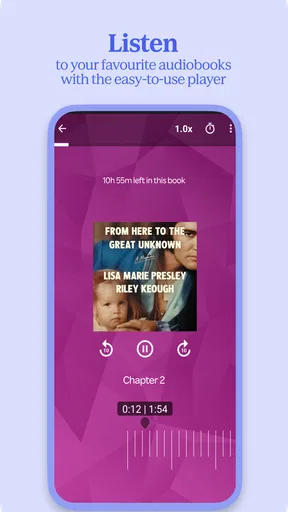
If you’re an audiobook fan, you’re in for a treat. The audiobook section is just as robust as the eBook one. The player is intuitive, with all the controls you’d expect. You can adjust the playback speed, set a sleep timer, and even bookmark your favorite parts. It’s these little features that enhance the overall listening experience.
One thing I love is the seamless switch between reading and listening. If you’re in the middle of an eBook and decide you’d rather listen, you can pick up right where you left off in the audiobook version. This flexibility is a game-changer for those who like to switch between formats.
Small habits that make the app more useful
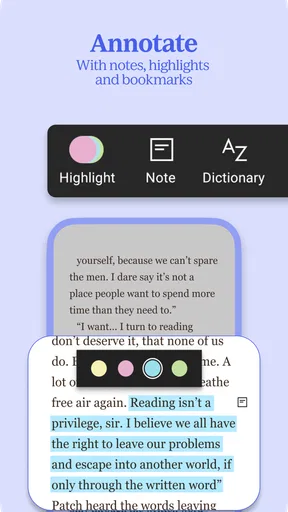
I would treat the sleep timer as more than a bedtime extra: it is handy whenever I want audio to stop without having to keep checking the phone. For a commute or a walk, playback speed lets me choose a pace that suits the material and my attention, rather than forcing every narrator into one rhythm. Bookmarks are useful when a passage deserves a return visit, especially if I am listening while my hands are occupied and cannot note anything down.
For switching between text and audio, I would make the change at a natural pause and confirm that the reading position has carried over before relying on it during a busy day. The convenience is real, but the two formats are not interchangeable in every situation: a passage that is easy to scan on a page may be harder to locate by listening, while audio can work far better when my eyes are busy. That is why I see format switching as a flexible option, not a reason to abandon the format that suits a particular book.
Discovering New Reads
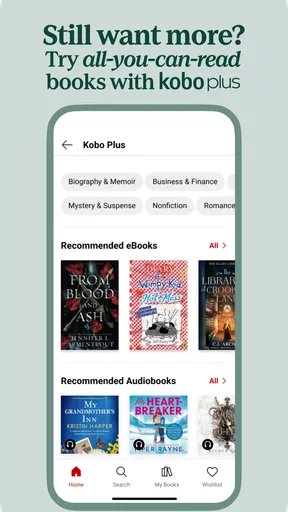
Kobo’s recommendation engine is pretty spot-on. It curates suggestions based on your reading habits, and I’ve found some real gems this way. There’s also a nifty feature called ‘Kobo Plus’ which is a subscription service offering unlimited access to a vast library of books. Think of it like Netflix, but for your reading list.
Don’t forget the community aspect! Kobo has a feature called ‘Reading Life’ that lets you rate, review, and share books with other readers. It’s a neat way to connect with fellow book lovers and discover what others are enjoying.
Recommendations, subscriptions, and browsing trade-offs
Personalized suggestions are helpful when I want to browse without arriving with a title in mind, but I would not let a recommendation feed become my only way to choose. It reflects what I have read, so it may keep pointing toward familiar territory. When I want something outside that pattern, searching by author, subject, or a specific title is a better starting point. The community features can also help surface books other readers enjoyed, but reviews are opinions, not a guarantee that a book will suit my taste.
Kobo Plus may be worth investigating for someone who reads widely and likes the idea of paying for access rather than choosing each title individually. The sensible comparison is to look at the books you genuinely expect to read and compare that with their individual purchase prices and the subscription’s current terms. A subscription is poor value if I only finish a book now and then, or if the titles I want are not included. I would not subscribe just because the option appears inside the app.
For price-conscious readers, I would compare the same title across the options available to them before buying. A library service may be a better fit when borrowing is possible, while a one-off purchase can suit someone who wants a specific book without taking on a recurring commitment. Kobo’s advantage is having browsing, reading, audio, and reader-oriented features together; that convenience is valuable, but it is not proof that every title is the best deal there.
Who is likely to get the most from it?
I think Kobo makes the strongest case for people who read regularly but do not always have the same kind of free time. A student might use it for a novel between classes and an audiobook on the walk home; a parent could listen while doing routine tasks, then continue reading after the house is quiet. Someone who already switches between formats is more likely to appreciate the combined experience than a reader who only wants a simple place to open one occasional eBook.
It is also a reasonable option for readers who enjoy exploring recommendations and sharing reactions. The community layer gives browsing another route beyond bestseller lists, while the reading controls make it easier to adapt the display to personal comfort. The app has a 4.5 average from around 298,000 ratings, and it has been installed over 10 million times, suggesting it has found a substantial audience. Those figures are useful context, but they cannot tell me whether its catalog, pricing, or reading style will suit an individual.
I would suggest skipping it—or at least comparing alternatives—if you want every book at no cost, dislike making account-based choices, or need a single-purpose audiobook tool rather than an eBook-and-audio library. It may also be unnecessary if your preferred titles are already easy to borrow elsewhere. Kobo’s content rating is Teen, so it is aimed at a broad audience, but that label is not a substitute for checking whether a particular book is suitable for a younger reader.
Final Thoughts
So, is Kobo | eBooks & Audiobooks worth your time? In my opinion, absolutely! It’s a well-rounded app that caters to both eBook and audiobook enthusiasts. The customization options, seamless integration between reading and listening, and a strong recommendation engine make it a must-try for any book lover.
Whether you’re a casual reader or a bookworm, Kobo offers a platform that adapts to your reading style. And with the added bonus of connecting with a community of readers, it’s more than just an app — it’s a reading experience.
Ready to dive into your next great read? Give Kobo a try! You might just find it becomes your go-to app for all things books.
My buy-or-skip verdict
I would try Kobo if I wanted one app for both eBooks and audiobooks, valued adjustable reading settings, and expected to use its discovery tools. The free download makes that trial easy to consider, while individual purchases and in-app options mean I would still check costs title by title. For occasional readers, a library-based alternative may offer better value; for people who want a large, flexible reading routine, Kobo’s mix of formats and controls is a persuasive reason to keep it installed.
Pros
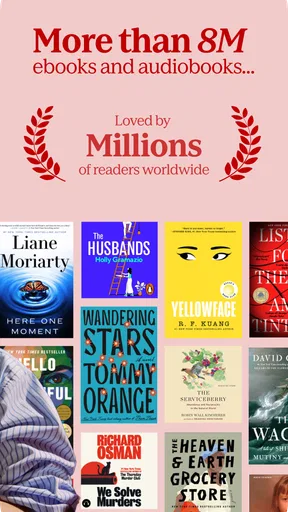
- Wide selection of eBooks and audiobooks.
- User-friendly interface for easy navigation.
- Syncs across multiple devices seamlessly.
- Offers personalized recommendations.
- Supports various reading formats.
Cons
- Limited offline access for some titles.
- Occasional syncing issues reported.
- Audiobook library less extensive than competitors.
- Some titles can be pricey.
- Requires account creation to browse.
FAQs for Kobo | eBooks & Audiobooks
What is Kobo | eBooks & Audiobooks?
Kobo is a versatile app designed for book and audiobook enthusiasts. It provides access to a vast library of eBooks and audiobooks across various genres. Users can purchase, download, and read or listen to their favorite titles using a single platform, making it a convenient choice for any avid reader or listener.
Is Kobo available on both Android and iOS devices?
Yes, Kobo is available for download on both Android and iOS devices. This cross-platform availability ensures that users can enjoy seamless access to their library on smartphones and tablets, regardless of the operating system they prefer. Users can find the app on Google Play Store and Apple App Store.
Can I read eBooks offline with Kobo?
Absolutely! Kobo allows users to download eBooks to their devices, enabling offline reading. This feature is perfect for those who want to enjoy their favorite books during travel or in areas without internet access. Just ensure your books are downloaded before you go offline.
Does Kobo support different file formats for eBooks?
Kobo supports a variety of eBook formats, including EPUB, PDF, and MOBI. This flexibility allows users to transfer and read books purchased from other platforms. Additionally, Kobo's platform ensures a smooth reading experience with customizable fonts and text sizes.
Are there any subscription services available on Kobo?
Kobo offers a subscription service called Kobo Plus, which provides unlimited access to a vast selection of eBooks and audiobooks for a monthly fee. This service is ideal for avid readers who want to explore new titles without purchasing each book individually. A free trial is often available for new subscribers.


